Tools · Updated July 9, 2026
Musician Discord Server Setup Guide + Template
A musician Discord server works best when fans already want more access, context, and ways to participate than they can get from a feed post.
It gives that existing interest somewhere to gather, which makes your most active listeners easier to recognize and reach again.
Use Discord for musicians as an owned community layer: listening parties, demo reactions, release-team moments, fan roles, show reminders, merch votes, and conversations with people who already care enough to show up.
Musician Discord Server: Quick Setup
A useful musician Discord server starts with a small channel list, one clear reason to join, and one repeatable fan ritual. Build the first version around welcome, announcements, general chat, music, shows, feedback, and a role-gated room for active fans or supporters.
| Server piece | Purpose | Best first move |
|---|---|---|
| Welcome | Orient new fans | Pin the newest song and first action |
| Announcements | Release, show, merch, and video updates | Keep it low-noise so fans do not mute it |
| Music | Demos, listening parties, and release threads | Ask for one specific reaction, not vague feedback |
| Roles | Identify active fans and supporters | Create one release-team role first |
Quick Answer: Should Musicians Use Discord?
Musicians should use Discord when they have fans who want more than passive social posts: people who reply, buy merch, show up to streams, come to shows, ask about unreleased music, or want a closer relationship with the artist world. Discord is best for building a music fan community, not for magically creating one from zero.
If you are still early, start simple. Use Discord as one owned-audience layer next to email, SMS, smart links, shows, and social content. The goal is not a giant empty server. The goal is a smaller group of people who talk, share, buy, show up, and help the next release move.
Discord Servers for Musicians vs Fan Community
Public Discord servers for musicians can help with collaboration, feedback, and scene-building. A fan server has a different job: it gives people who already care about your music a closer place to gather around the project.
If you are an artist, the fan-server version matters more for music marketing. It gives you a place to test ideas with warm fans, organize release support, collect feedback from people who know the project, and give active listeners a reason to come back between posts.
Why Musicians Should Use Discord
Discord gives musicians a different kind of fan signal than social platforms:
- You own the community: Discord gives you a direct line to fans without an algorithm deciding which post gets buried.
- Real-time interaction: Text channels, voice channels, and stage channels let you hang out with fans live without turning every moment into content.
- Segmentation: Create different channels for different fan interests: general chat, music discussion, exclusive content, merch, shows, and release-team tasks.
- Superfan identification: Your most active Discord members are your superfans. These are the people who buy merch, come to shows, and tell their friends about you.
- Algorithm-proof: Announcements can reach members who opted into notifications instead of getting filtered through a feed.
Discord vs Email, SMS, and Social Media
Discord should not replace every other fan channel. Each channel has a job:
| Channel | Best for | Weakness |
|---|---|---|
| Discord | Community, conversation, listening parties, fan roles, and superfans | Can feel empty if you do not lead the room |
| Reliable announcements, releases, merch, tickets, and longer stories | Less conversational | |
| SMS | Urgent drops, show reminders, and high-intent fan actions | Easy to overuse |
| TikTok/Reels/Shorts | Discovery and content testing | You do not own the reach |
| Smart links | Tracking fan actions and routing listeners to the right platform | Needs follow-up channels to become relationship data |
The strongest fanbase system uses social content to create discovery, smart links to track intent, email/SMS for reliable reach, and Discord for community depth.
How to Set Up a Musician Discord Server
- Create your server: Go to discord.com, create an account, and create a new server. Name it after yourself or your band.
- Create channels: Start simple. A #welcome channel, a #general chat, a #music channel for sharing your releases, a #updates channel for announcements, and a #fan-art or #fan-photos channel.
- Set up roles: Create roles like "OG Fan," "Super Fan," or "Patron" to reward your most dedicated members with special permissions and channels.
- Write your rules: Keep it simple and positive. Community guidelines prevent toxicity before it starts.
- Create an invite link: Generate a permanent invite link and share it in your Instagram bio, TikTok, YouTube descriptions, email footer, smart links, and at live shows.
Best Discord Server Channels for Musicians
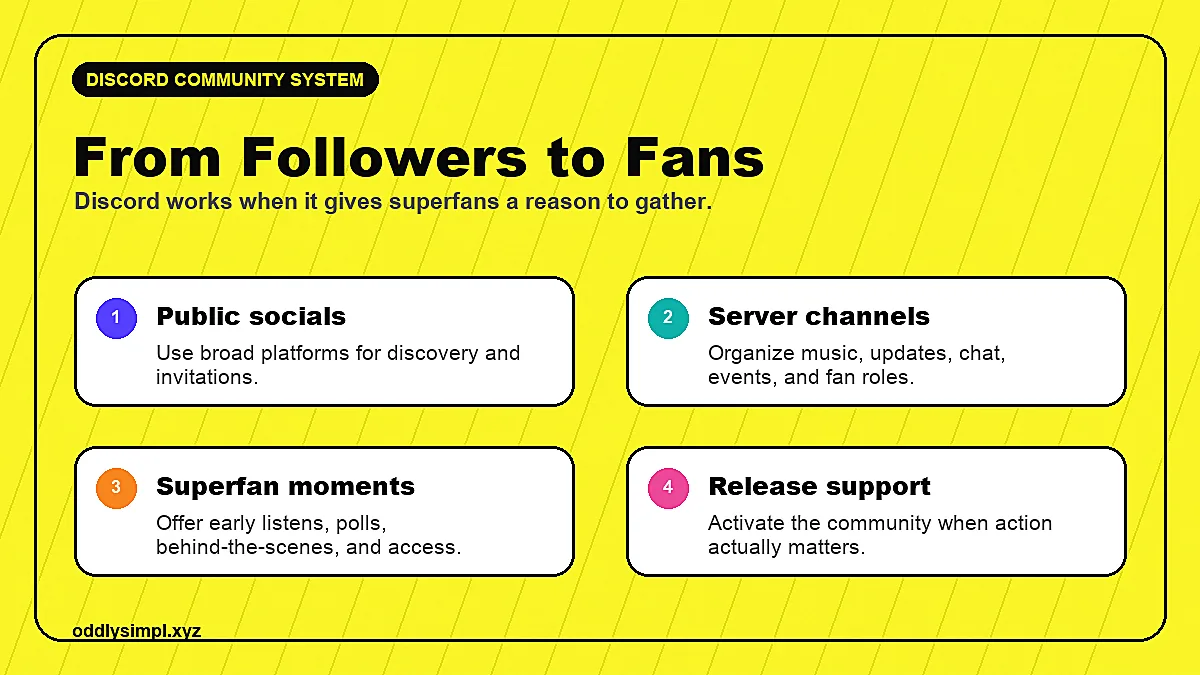
Start with fewer channels than you think. Empty channels make a server feel dead.
- #welcome: what the server is, what fans can do first, and links to your music.
- #announcements: releases, shows, merch, videos, and important updates.
- #general: casual fan conversation.
- #music: your releases, demos, playlists, and listening-party threads.
- #shows: tour dates, local meetups, ticket reminders, and recap photos.
- #feedback: optional private or role-gated space for trusted fans to react to ideas.
- #exclusive: role-gated content for Patreon supporters, merch buyers, or day-one fans.
Musician Discord Server Template
A good musician Discord server template starts with one question: what job should this server do during the next 30 days?
If you have a release coming, build the server around release support. If you have shows coming, build it around ticket reminders, meetups, and city-specific fan moments. If you are between releases, use it for demos, taste-building, and fan research.
- Welcome message: tell fans who the server is for, what to do first, and where to hear the newest song.
- Release team role: give active fans a clear way to help with comments, shares, pre-saves, merch votes, or show reminders.
- Listening-party format: schedule one live room, one replay thread, and one follow-up post with the song link.
- Feedback boundary: decide whether fans can give creative feedback, and keep that channel role-gated if you do not want every opinion in the room.
Musician Discord Server Setup Checklist
Keep the first version small enough to maintain. A musician Discord server with seven active rooms beats a 40-channel maze nobody uses.
- Use your artist or band name so fans know they are in the right place.
- Write one welcome message with the newest song, the main rules, and the first thing to do.
- Pin the invite link in your bio link, YouTube descriptions, email footer, and show QR code.
- Create one release-team role for fans who want to help with comments, saves, shares, and show reminders.
- Schedule one repeatable ritual: demo Friday, monthly listening party, weekly show thread, or Sunday fan Q&A.
- Track active members, repeat commenters, link clicks, ticket interest, and merch votes instead of bragging about server size.
Content Ideas for Your Discord
- Exclusive pre-release song snippets
- Voice Q&As in a live voice channel
- Behind-the-scenes from the studio or on tour
- Fan polls on merch designs, setlists, or creative decisions
- First access to tickets and merch drops
- Monthly listening parties for new releases
How to Keep a Music Discord Active
Most artist servers die because the artist opens too many channels and then disappears. Keep the rhythm small enough to maintain.
Pick one weekly ritual: a Friday demo drop, a Sunday listening thread, a monthly live Q&A, or a release-team task when a campaign is active. Fans need a reason to check back, and you need a format you can repeat without hating your life.
Do not measure the server by member count alone. Track active members, repeat commenters, listening-party attendance, link clicks, merch votes, ticket interest, and how many people take action when you ask. That is the difference between a vanity community and a fanbase tool.
Growing Your Discord
The best way to grow your Discord is to mention it everywhere and offer something worth joining for. Share the link on every social platform. Tease exclusive content that's only available in Discord. Partner with other artists in your genre and cross-promote your servers.
Do not pitch Discord as "join my server." Pitch the specific reason to join: hear demos first, vote on merch, get early ticket links, join a listening party, see behind-the-scenes clips, or help choose the next single.
Measure Discord like a real fanbase tool. Watch active members, replies, event attendance, merch clicks, ticket clicks, pre-save clicks, and which members repeatedly take action. Then compare that behavior with music analytics so you know whether the community is helping the music move.
If your main problem is still getting people into the top of the funnel, pair this with the get your music heard guide and the TikTok fanbase guide. Discord works best after people already have a reason to care.
Musician Discord FAQ
Should musicians use Discord?
Use Discord when you have fans who want more than passive social posts. It is better for listening parties, demos, fan roles, merch drops, and release-team moments than for cold discovery.
What channels should a musician Discord server have?
Start with welcome, announcements, general chat, music, shows, feedback, and one role-gated exclusive channel. A few active rooms beat a huge empty server.
How do musicians grow a Discord server?
Give fans a specific reason to join: hear demos first, vote on merch, get early ticket links, join a listening party, or help choose the next single.
Is Discord better than email for musicians?
Discord is better for conversation, community, and fan participation. Email is better for reliable release, ticket, and merch announcements. Use both if fans are active enough to justify it.
Ready to build a real fan community? Work with simpl. We help artists build the audience that fills their Discord, their shows, and their merch store.
Keep building the strategy
-
Smart links for music
Choose better landing pages for releases, videos, and fan journeys.
-
Music marketing strategies
Connect your tools to a larger fan-growth system.
-
Spotify ads for artists
Use your analytics to build campaigns around real listener behavior.
About the author

Anthony Pacheco
Anthony Pacheco is the founder of simpl., a former Sony Music analyst, and a Billboard-charting musician who has helped run 750+ artist marketing campaigns. He writes about real listener behavior, release systems, Spotify ads, and how artists can grow without fake playlist traffic.